TikTok Video Downloader
Free online TikTok downloader without watermark. Download high quality TikTok videos in HD MP4 or convert to MP3 audio fast on any device.
Three Simple Steps to Save Video Content
-
Step 1: Copy the Post Link
Open the clip in your app or browser, tap Share, and select Copy Link.
-
Step 2: Paste the URL into SaveTik
Insert the copied web address into the input box above to identify available formats.
-
Step 3: Choose Your Preferred File
Select HD video, standard MP4, or MP3 audio to download the file directly to your device.
Why Choose SaveTik
One Link, Multiple Formats
Paste a supported public link to choose between MP4 video formats or standalone audio files.
Pure Browser Access
Designed to operate within modern mobile and desktop web browsers without extra software.
Archive Clips for Offline Viewing
Save valuable reference clips to your local storage before posts are removed or updated.
HD and Standard Resolutions
Select higher-resolution streams when available, or choose standard sizes to save storage.
Standalone Audio Files
Where separate audio tracks are supported, SaveTik offers an option to save sound files as MP3.
Zero Sign-Up Required
Provides convenient browser access without creating user profiles, passwords, or subscriptions.
Download TikTok Videos Without Watermark in HD
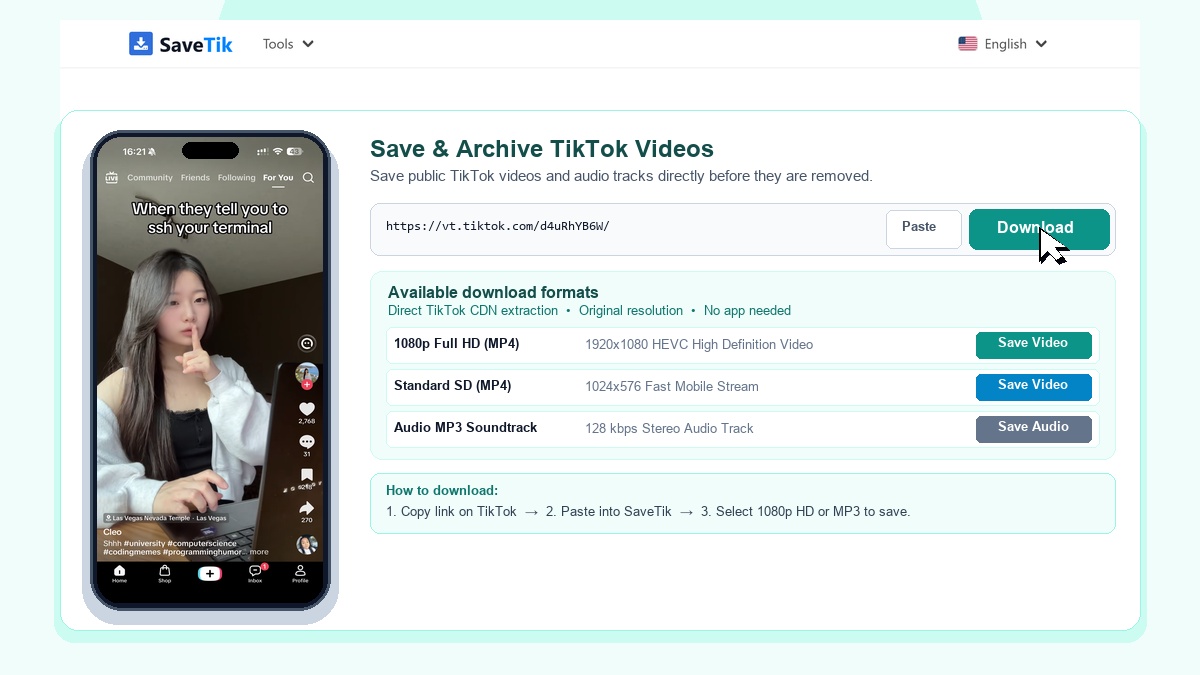
SaveTik is a free online tool to download and archive TikTok videos without watermark in HD quality. Save your favorite clips and MP3 audio directly to your device before they get deleted or made private. 100% free with no registration required.
Key Features of SaveTik
No Watermark
Automatically removes TikTok watermark and logo for clean video playback.
Save in 1080p HD
Download videos in original high-definition resolution up to 1080p Full HD.
Save MP3 Audio
Extract background music and sound tracks as separate MP3 audio files via TikTok MP3 converter.
No App Needed
Works directly in your web browser on iPhone, Android, Windows, and Mac.
How to Download TikTok Videos in 3 Steps
- Copy Link: Open TikTok, find the video you want, tap Share, and choose Copy Link.
- Paste Link: Open SaveTik in your browser, paste the link into the box above, and click Download.
- Save Video: Choose Save Video HD or Save Audio to keep the file.
For iPhone / iPad Users: Tap Download in Safari. When finished, tap the download icon in Safari's address bar, open the clip, tap Share, and choose Save Video to store it in your Photos app.
Why Use SaveTik?
SaveTik helps you preserve videos before links expire or accounts change privacy settings. It is fast, free, and does not require app installations. You can also save 24h stories with our TikTok Story downloader, download photo carousels with our TikTok Photo downloader, or download Chinese clips with our Douyin downloader.
Privacy & Fair Use
SaveTik does not store downloaded files or track user data. Only publicly available clips can be downloaded. Please respect content creators by using saved media for personal offline viewing.